
Every business has small jobs that repeat. Over and over. A new lead comes in, someone has to add it to the CRM, send a reply, create a follow-up task, update a spreadsheet, and notify the right person.A spreadsheet gets updated. None of this is hard. It just never stops.
This is where business automation tools can help. Instead of replacing your team, they can take care of repetitive steps and leave people to handle work that needs judgment, communication, or creativity.
The key is choosing the right task to automate, not simply adding more AI tools to your software stack.Below are the best business automation tools worth knowing, and how to pick the right one for your business.
What Can AI Automate in a Business?
Automation works best with a clear start and a clear next step. Think about a new website lead. It comes in. It gets checked. It gets added to your CRM. Someone follows up. Basic automation can handle those steps. AI helps when a task needs some thinking first, like reading a message, sorting a lead, or picking where a request should go.
This is where business automation tools earn their keep. Zapier and Make are two well-known automation platforms for business. They link your everyday apps together, then add AI into the gaps. Zapier connects with over 9,000 apps. Make offers similar reach through visual workflows. Some tools also use AI agents that work across apps on their own. Want to learn more? Check our guide on AI agents for businesses.
Which Business Tasks Should You Automate First?
Don't ask what AI can do first. Ask what wastes your team's time each week. That's the real way to automate your business.
A good task to automate usually looks like this:
It happens often
It follows the same steps each time
It means moving details between apps
A delay could cost you a lead
The work does not need a person to make every decision.
Here's a simple rule: automate the busywork, but keep a person in charge when a mistake would cost you. That's how smart teams use business automation tools.
Best Business Automation Tools
Here are five of the best business automation tools worth testing. Each one shines in a different way.
1. Zapier: Best for Connecting Everyday Apps
Zapier works well when your business uses several apps that need to talk to each other. Set a trigger, and Zapier handles the rest. A new form entry can add a contact, send an email, and create a task, all on its own. It's one of the easiest automation tools for business owners without a tech team.
Good for: Lead management, notifications, email workflows, CRM updates, and connecting everyday business software.
2. Make: Best for More Complex Workflows
Make is worth considering when your process has several steps, conditions, or different paths. For example, an incoming customer request could be analyzed by AI, sent to the correct team, added to a database, and trigger a follow-up depending on the request type.
Make also supports AI agents that can work across connected applications and workflows.
Good for: Operations, marketing workflows, data processing, lead routing, and multi-step automation.
3. HubSpot: Best for CRM-Based Tasks
Already using HubSpot for your CRM? Its built-in workflows cover a lot of sales work. A demo request can update a contact, assign a rep, and send a confirmation, all without lifting a finger. HubSpot also lets you connect AI agents to specific actions. For sales teams, this is one of the more complete business automation platforms, since your data and automation live in one place.
Good for: Sales teams, lead nurturing, customer service, CRM updates, and follow-ups.
4. n8n: Best for Technical Teams
n8n gives more control to teams who like to see how things work. Its AI builder turns plain sentences into working flows, and you can still check every step yourself. Want a business automation platform that goes past simple drag-and-drop? n8n is a solid pick.
Good for: Technical teams, custom workflows, AI agents, API-based automation, and businesses with more complex requirements.
5. Microsoft Power Automate: Best for Microsoft-Based Companies
Running on Microsoft 365? Power Automate is often the easiest fit. It links cloud apps, desktop software, and even older systems into one process. It blends low-code automation with AI, which makes it a dependable business automation system for teams already using Microsoft tools.
Good for: Microsoft 365 environments, internal operations, approvals, document processes, and enterprise workflows.
Business Automation Tools Comparison
Here's how all five stack up.
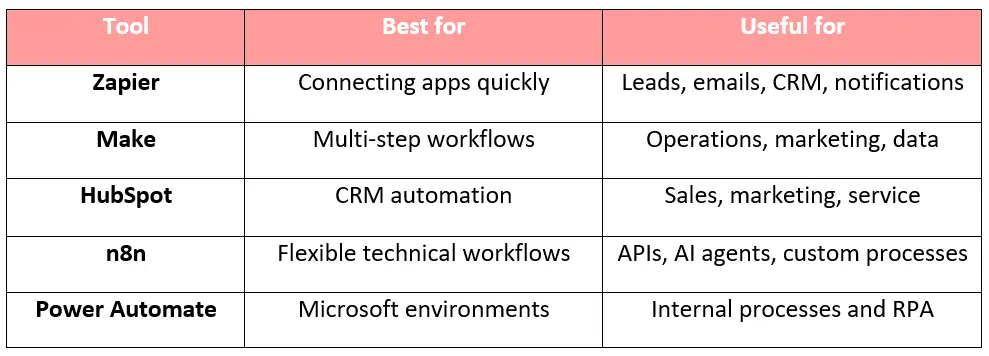
These are some of the best business automation tools out there. But the right pick depends on your workflow.
How to Choose the Right Business Automation Tool
Want the right business automation system? Start by mapping your process on paper: trigger, steps, decision, action, result. For example: a customer fills out a form, details get checked, a salesperson gets assigned, and a confirmation goes out.
Then ask yourself:
Does it connect to the apps you use?
Can it run the whole workflow, or just one piece?
Will AI really help, or would a simple rule do?
Can a person check things before they go live?
How much time will this save each month?
That last question matters most. Saving ten minutes a month? Not worth the setup. Saving two hours a day? That's a different story.
Common Business Automation Mistakes to Avoid
The biggest mistake is automating a bad process.If your team currently has five unnecessary steps, putting AI on top of those five steps will not fix the underlying problem.
Other mistakes to avoid:
Trying to automate everything at once
Buying software before mapping the workflow
Running two tools that do the same job
Letting AI handle sensitive actions with no review
Ignoring failed workflow alerts
Tracking activity instead of real time saved
Start small. Pick one repeat task. Measure what it saves. Then build from there.
When Off-the-Shelf Business Automation Tools Aren't Enough
No-code business automation apps handle most standard jobs well. But some businesses need more. Maybe you need one workflow that links your website, database, CRM, and AI model together.
At that point, another subscription won't help much. A custom-built automation fits your business better than forcing your team to bend around a tool's limits. CanDev's AI development services build custom AI workflows around your exact process, not a generic template.
The goal was never to add more AI just to add it. It's to clear out busywork, so your team can focus on what actually needs a person.
Want a workflow built around how your business really works? Talk to our team, and we'll help you map it out.
Final Thoughts
The right business automation tools can save hours of manual work, reduce repetitive tasks, and help your team focus on work that actually needs human input. But you don't need to automate everything at once.
Start with one process that takes up too much time, choose a tool that fits your existing workflow, and measure the results. If your processes become too complex for off-the-shelf tools, custom AI automation can give you more flexibility and control.
The goal isn't to add more tools to your business. It's to build a smarter workflow that helps your business run more efficiently.